Many people with hearing aids want an easy way to control their devices every day. The Oticon Companion App helps with that. It lets you change volume, switch programs, and do more right from your phone. This app makes life simpler because you do not need to touch your hearing aids all the time.
In this guide, you will learn what the app is, how to download it for Android or iPhone, how to install it, and how to update it safely. You will also find clear steps for compatibility checks and ways to fix common problems like the app not working or keeps disconnecting. Everything is explained in very simple steps so even beginners can follow along easily. After that, you will feel more confident using your hearing aids with your phone.
What Is the Oticon Companion App?
The Oticon Companion App is a free tool made for people who use Oticon hearing aids. It connects your phone to your hearing aids using Bluetooth. This means you can control sound quietly without anyone noticing.
For example, imagine you are at a family dinner. The room gets noisy, but with the app you can lower the volume or change to a better listening program in just a few taps. Another thing is that it shows your hearing aid battery level so you know when to charge them.
Over time, this app helps you feel more independent because you adjust settings yourself. It also includes a feature for remote help from your hearing care professional. That is why many users like it for daily use. The app works on both Android phones and iPhones, but you need the right version for your device.
In addition, the app replaced older tools like the Oticon ON app. This change makes things simpler because one app now handles control and remote support together.
Oticon Companion App Download for Android and iPhone
Getting the app is the first easy step. Start by opening the store on your phone. For Android users, go to the Google Play Store. Search for “Oticon Companion” and tap the official app. It is free to download, so press the install button and wait a short time for it to finish.
For iPhone users, open the Apple App Store. Type the same name and choose the correct app from Oticon. After that, use your Apple ID to download it if needed. The process takes only a minute or two on a good internet connection.
Next, make sure your phone has enough space and a stable Wi-Fi connection. This helps the download go smoothly without stopping halfway. Once it is on your phone, open the app to begin setup. Many people feel happy after this step because their phone is now ready to connect with their hearing aids.
If you have an older phone, check the store first to see if the app appears. Some very old devices may not show it, and that is normal.
How to Install and Set Up the Oticon Companion App
After the oticon companion app download, installation happens automatically in most cases. Open the app and follow the simple screens that appear. You may need to allow Bluetooth and other permissions because the app needs them to talk to your hearing aids.
For Android, the setup often starts right inside the app. Turn on your hearing aids and bring your phone close. The app will look for them and guide you to pair. It is like connecting wireless earbuds, but for hearing aids.
On iPhone, you sometimes pair through the phone’s settings first under accessibility or hearing devices. After that, the app takes over for fine control. This small difference exists because each phone system works in its own way.
A real-life example is this: A person named Sarah downloaded the app on her new Android phone. She followed the steps, paired her aids, and right away could change volume while watching TV. She felt excited because it was so quick.
Always keep your hearing aids close during setup. Also, make sure they have some battery power. These small tips help the first connection succeed.
Oticon Companion App Compatibility – Android and iPhone
Not every phone works perfectly with the app, so checking compatibility is important. Oticon hearing aids from recent years usually connect well, including models like Opn and newer ones. Older aids from 2016 to 2018 may need a firmware update first at your hearing care office.
For Android compatibility, your phone needs Android version 8.0 or higher in most cases. Popular brands like Samsung, Google Pixel, and others often work fine if they are not too old. Check Oticon’s support pages for your exact model to be sure.
Oticon companion app for iPhone needs iOS 15.2 or later for best results. It also supports Apple Watch for quick changes like volume or programs without taking out your phone. This is handy when you are busy.
Another thing is that the app works with most Bluetooth-enabled Oticon hearing aids. However, if your aids are very old, they might not support all features. That is why visiting your professional for a quick check can save time later.
In 2026, newer phones handle connections better because of improved Bluetooth technology. If your phone is recent, you will likely have fewer issues from the start.
Step-by-Step Oticon Companion App Guide and Instructions
Using the app becomes easy once you know the main parts. Open the app and you will see clear buttons for volume, programs, and battery. Slide your finger to make sounds louder or softer in each ear separately if you want.
For example, you can switch listening programs for different places like quiet rooms or busy streets. The app also lets you use your phone as a remote microphone. This means you can place your phone near a speaker and hear the sound better through your aids.
Another useful part is the find my hearing aids feature. If you lose one, the app shows an approximate location on a simple map. Many users say this saves them stress during daily life.
You can also adjust sound while streaming music or calls. The equalizer helps make voices clearer in noisy spots. These instructions work the same on both Android and iPhone after pairing.
Take time to explore each section slowly. Read any help tips inside the app because they explain things in simple words. Over time, you will remember the steps without thinking much.
Oticon Companion App Update – How and Why to Do It
Keeping the app fresh is key for smooth performance. Updates add new fixes and sometimes extra features like better sound control. To update, go to your phone store, find the app, and tap the update button if it shows.
Do this regularly, perhaps once a month, because new hearing aid improvements often come through app updates. After updating, restart your phone to help everything settle.
For instance, some users noticed better battery readings after an update. Another benefit is fewer connection drops over time. Always update your phone system too, as old software can cause small problems.
If an update feels big, do it when you have time to test the app afterward. This simple habit keeps your oticon companion app running well for years.
Oticon Companion App vs Oticon ON App – Simple Comparison
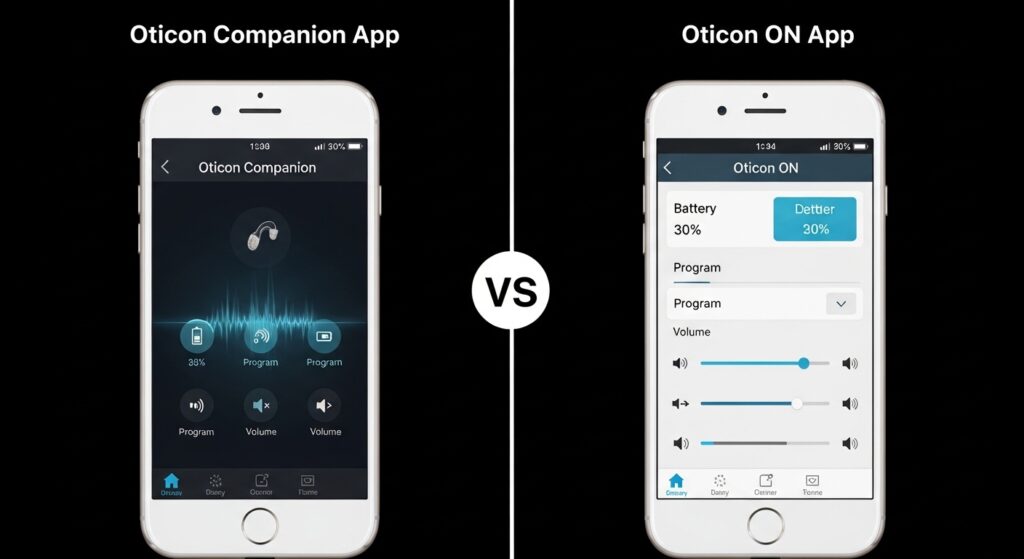
The older Oticon ON app handled basic controls, but the new Companion app combines it with remote care features. This means you no longer need two separate apps for most tasks.
The Companion version feels cleaner and easier for many people. It removed some rarely used parts to make the main screen simpler. However, both apps let you change volume and programs.
Most new users start directly with the Companion app because it is the current choice. If you still have the ON app, you can switch when ready. The change helps because everything stays in one place now.
Common Problems with Oticon Companion App and How to Fix Them
Sometimes the app does not work perfectly at first. One frequent issue is oticon companion app not working or keeps disconnecting. This can happen because of weak Bluetooth, too many other devices connected, or old software.
To fix disconnection, first restart your phone and hearing aids. Turn them off completely for ten seconds, then turn them back on. After that, open the app again. This simple step solves the problem for many users.
Another common issue is the app showing only one hearing aid. This usually means the aids need re-pairing. Go into the app settings, choose to pair new hearing aids, and follow the steps carefully.
For Android users, problems with oticon companion app android can include battery drain or slow response. Close other apps running in the background to help. Also, keep your phone within a few feet of your aids for strong connection.
On iPhone, some notice issues after a big iOS update. In that case, re-pair the aids through phone settings and then the app. Updates to the app itself often fix these quickly.
If the app keeps asking to pair again, check for “ghost” connections from old devices. Your hearing care professional can clear extra connections from the aids. This trick has helped many people stop random drops.
Other oticon companion app problems like slow loading can improve by reinstalling the app. Delete it, download fresh, and set it up again. Do not worry – your settings usually come back after pairing.
Always try basic steps first: restart everything, check Bluetooth is on, and make sure your aids have power. These actions fix most issues without extra help.
Tips to Avoid Mistakes and Get the Best Experience
Here are some friendly tips to make your time with the app better. First, do not connect your hearing aids to too many phones or tablets at once. Extra connections can cause interference and more disconnections.
Second, update your hearing aids firmware when your professional suggests it. Newer versions work better with the current app.
Third, practice using the app in quiet places first so you learn the buttons comfortably. For example, adjust volume while sitting at home before trying it in a crowded market.
Another good idea is to use the in-app troubleshooting section. It gives quick answers for common questions without calling anyone.
Avoid keeping the app open all day if you do not need it. Open it only when you want to change something. This helps save phone battery.
In addition, read any quick guide that comes with your hearing aids. It often has pictures that match the app screens.
Final Thoughts on Using the Oticon Companion App
Learning the Oticon Companion App opens up a more comfortable way to live with hearing aids. From easy download on Android or iPhone to daily controls and remote support, it brings helpful tools together in one place.
Remember to check compatibility, keep everything updated, and use simple restart steps when small issues appear. With a little practice, the app will feel natural, like any other tool on your phone.
Many people enjoy more confidence because they can adjust sound quietly anywhere they go. Take your time, explore the features, and reach out to your hearing care team if you need extra guidance.
In the end, the goal is better hearing and easier days. This app supports that nicely when you use it step by step.
Disclaimer:
This article provides general information based on common user experiences and publicly available details about the Oticon Companion App as of 2026. It is not official advice from Oticon. Always check the latest compatibility, instructions, and updates directly with Oticon support or your hearing care professional, as features and requirements can change. Results may vary by device, hearing aid model, and software version. For personalized help, contact qualified experts. This guide is for educational purposes only and does not replace professional medical or technical support.
Explore More:
Chat Board App Review 2026: Download, Login, Features, Is It Safe & Free?
Airmid App Review 2026: Login, Download for PC, NHS Features & Is It Safe?
About the Author